Component Modeller
In CADMATIC, component models (also known as GDL objects) contain the building instructions for components that designers insert into the 3D model in Plant Modeller. These building instructions are saved in the corresponding folder in the project environment.
A component model consists of the following:
- The geometric model, which is a collection of primitives and 3D shapes.
- Nodes that provide information on how to create connection nodes when the component model becomes an actual component instance in the 3D model.
- Attributes that define, for example, the mass and center of gravity of the component.
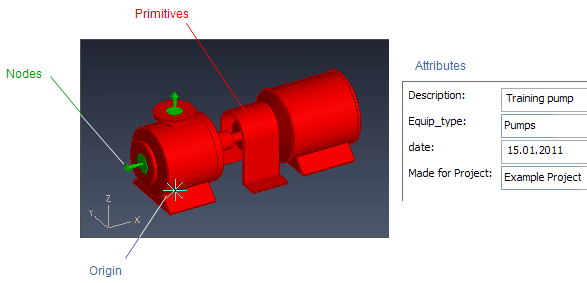
Component models can be used to create the following object types:
- Equipment
- Standard Component
- Structural Component (no nodes)
Equipment and Structural Components can contain parameters that allow the creation of different component sizes. These are called Parametric Models.
Standard Components have parameters whose values are set in the related Dimension Table configuration.
Creating a new component model can involve the following actions:
- Sketch primitives interactively. You can enter exact values for points, directions, and dimensions, or use parameterized expressions for points, directions, and dimensions to create a parametric component model.
- Use Import file to import 3D objects from supported file types.
- Use Import GDL to import existing GDLs.
- Use Load GDL to load a .GD file used before version 5.0 to convert an old component model to the current format.
You can transfer a finished GDL from one project to another by using the commands Export to CX File and Import from CX File in the project environment.